
Key Takeaways
- Reducing ACoS (Advertising Cost of Sale) requires aligning PPC bid structures with customer buyer intent while continuously optimizing listing conversion assets.
- ACoS expresses ad efficiency as a percentage (Ad Spend / Attributed Sales); lowering ACoS toward your Target ACoS (TACoS) preserves net profitability as catalog volume scales.
- Systematic ad optimization combines negative keyword sculpting, bid adjustments on low-converting queries, external Creator referral traffic, and rich media assets (A+ Content and Video).
Managing advertising campaigns across Seller Central, Vendor Central, or B2B channels with an escalating Advertising Cost of Sale (ACoS) severely strains net profitability.
Uncontrolled ad spend often stems from targeting generic high-volume search terms, under-optimized detail pages, or lack of negative keyword maintenance. Whether utilizing standard FBA (How Does Amazon FBA Work?) or specialized logistics, improving paid media return on investment is critical.
Lowering your ACoS on Amazon requires executing disciplined campaign governance alongside listing conversion enhancements. As an eCommerce Fractional CMO, I deploy this structured framework across brand catalogs to drive sustainable, profitable growth.
Don’t Bid Directly Against Legacy Category Leaders
Extracting high-volume search terms from category leaders via reverse-ASIN lookup tools (like Helium 10 or Jungle Scout) and launching aggressive broad-match campaigns is a common strategic error for emerging brands.
Attempting to compete directly on generic head terms against established category leaders holding tens of thousands of customer reviews leads to rapid ad spend depletion without proportional conversion yield.
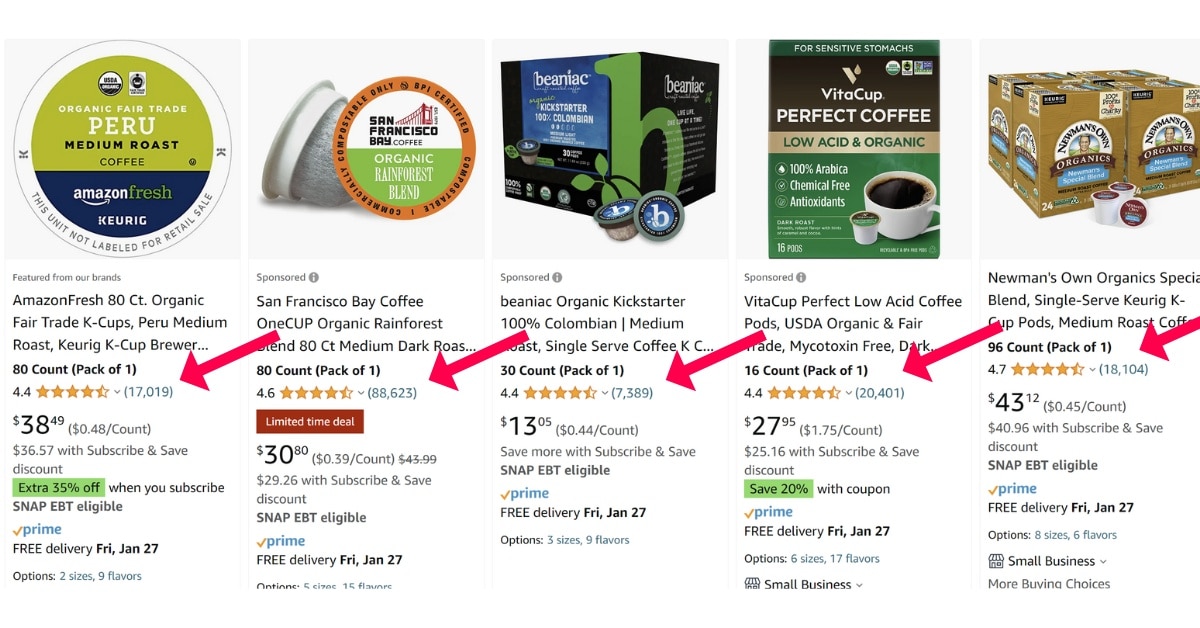
When a listing lacks deep review social proof, driving generic traffic creates high click volume without conversion completion, suppressing unit session percentages and driving up cost-per-click (CPC) rates.
To reduce ACoS, pivot capital allocation toward high-intent, long-tail search terms where legacy competitors occupy lower organic rank positions. Capturing long-tail conversion momentum builds historical sales velocity, lowering CPC bids over time.
Avoid Emulating Enterprise Brand Imperfections
A frequent error among scaling merchants is blindly mimicking the listing design and ad structures of legacy enterprise brands.
Market leaders often maintain strong sales velocity despite unoptimized listing copy or weak visual assets because they leverage massive off-platform brand equity:
- Cross-channel Meta and Google Search advertising campaigns.
- Large-scale Creator partnerships and Amazon Influencer networks.
- Large owned email and SMS subscriber databases.
- National PR placement and broad brand recognition.
This off-platform momentum offsets on-page conversion friction. Emerging brands lacking massive off-site traffic must maintain strict adherence to conversion copywriting, visual merchandising, and search optimization standards to maximize paid traffic efficiency.
Reduce ACoS Through Systematic Ad Optimization
High-Converting Amazon PPC Funnel Architecture
Mining customer search queries for new intent keywords
Validating keyword cluster conversion performance
Controlled bidding on high-converting exact queries
Amazon’s ad serving algorithm evaluates listing conversion rates when determining CPC auction pricing. Driving unqualified traffic that fails to convert suppresses relevancy scores, increasing required bid amounts across your entire ad account.
Executing structured campaign optimization directly reduces waste and improves profitability:
1. Focus Budget on Buyer-Intent Keywords
Distinguish between broad discovery terms and specific buyer-intent search queries. Long-tail queries signal that a shopper has defined their purchase parameters and is ready to buy.
- Broad Discovery Query:
Coffee Pods(High search volume, low immediate conversion rate). - High Buyer-Intent Query:
Recyclable Organic Dark Roast Coffee Pods(Lower search volume, significantly higher unit session conversion rate).
2. Systematic Negative Keyword Isolation
Audit Search Term Reports weekly to identify converting terms and isolate wasted ad spend:
- Download and export active Search Term Reports from Seller Central.
- Filter queries generating high click counts (e.g., 10+ clicks) with zero attributed conversions.
- Identify search terms irrelevant to your product’s specific attributes.
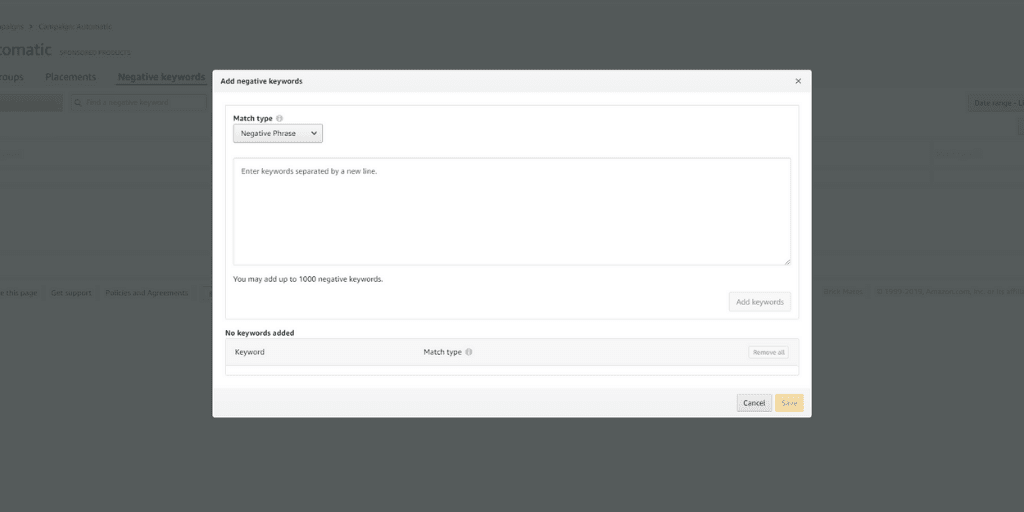
- Add non-converting or irrelevant terms as Negative Exact or Negative Phrase targets at campaign and ad group levels.
3. Bid Management & Placement Adjustments
Audit campaign targeting performance to align bid prices with profitability thresholds:
- Navigate to campaign targeting performance tabs inside the Advertising Console.
- Isolate keyword targets displaying ACoS figures significantly above target gross margin thresholds (e.g., ACoS > 50%).
- Reduce keyword bids incrementally (by 20% to 40%) on underperforming targets to lower acquisition cost without sacrificing indexing entirely.
- Pause targets displaying extreme spend with zero conversion yield.
- Increase bid aggressiveness on targets delivering ACoS below target profitability thresholds to capture additional impression share.
Leverage External Referral Traffic & Creator Networks
Directing off-platform referral traffic onto Amazon detail pages accelerates sales velocity while signaling product relevancy to search algorithms (Amazon SEO).
Collaborating with Amazon Influencers and Creator networks drives pre-qualified traffic to your listings. Because social traffic arrives with high purchase intent, unit session percentages increase, improving organic search rank and lowering overall campaign ACoS.
Enrolling in the Brand Referral Bonus program also reimburses brand owners an average of 10% in referral fee credits for sales generated via off-platform Attribution links (How to Drive External Traffic to Amazon).
Optimize Product Titles to Qualify Ad Clicks
Product titles directly impact ad click-through rates (CTR) and conversion completion. An optimized title qualifies buyers before they click your ad, preventing wasted ad spend from unqualified shoppers.
Title Architecture for Ad Efficiency:
- Lead with Brand Name and core product line identification.
- Incorporate primary value differentiators within the initial 67 characters for mobile visibility.
- Explicitly detail pack sizes, dimensions, colors, and key specifications.
- Address major compatibility requirements to prevent buyers seeking different specifications from clicking.
On-Page Conversion Optimization
Once paid ad traffic lands on your product detail page, conversion copy and visual assets determine whether that ad click converts into a sale (Amazon Listing Optimization).
Optimizing Feature Bullet Points:
- Bullet 1: State primary Unique Value Proposition and target user profile explicitly.
- Bullet 2: Detail core tangible outcomes and problem-solving capabilities.
- Bullet 3: Detail technical specifications while addressing top category objections.
- Bullet 4: Emphasize ease of setup, simple operation, and craftsmanship.
- Bullet 5: Eliminate buyer risk by detailing official brand warranties and guarantees.
Review explicit bullet copywriting frameworks in our detailed guide: How To Write Amazon Bullet Points.
Product Image Visual Merchandising
High-contrast, informative product gallery images directly elevate unit session percentages, increasing ad conversion efficiency.
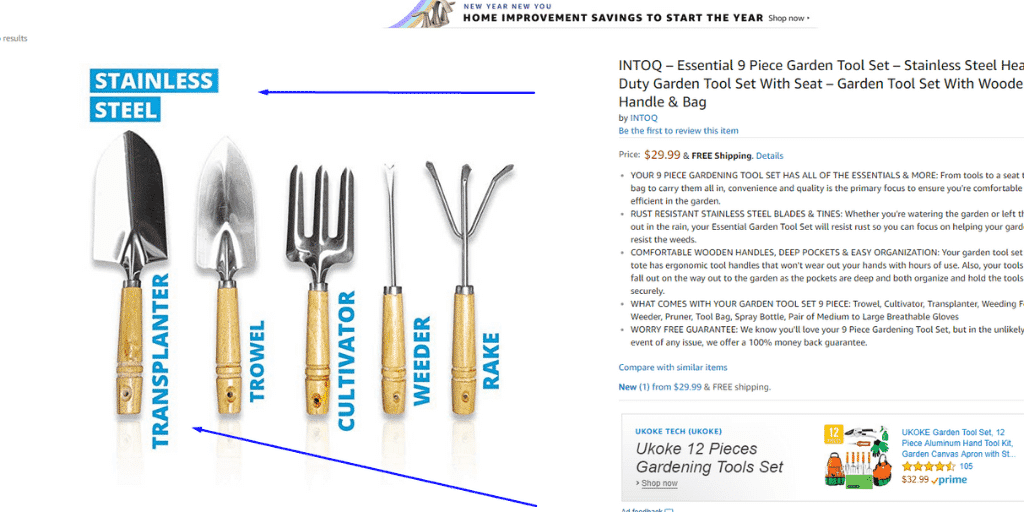
Incorporate infographic callouts, dimensional scale graphics, lifestyle context shots, and certification badges into gallery slots to resolve buyer questions visually (Amazon Product Images Best Practices).
Deploy Amazon A+ Content Landing Pages
Replacing standard text descriptions with Amazon A+ Content creates a visual landing page experience directly on your detail page.
Brand-registered merchants utilizing rich A+ Content modules, comparison charts, and brand storytelling experience average conversion rate lifts of 3% to 10%, directly depressing PPC ACoS metrics across active campaigns (Amazon Brand Registry Guide).
Review Volume & Social Proof Acceleration
Product review volume and star rating averages (4.3+ threshold) act as primary conversion drivers for paid ad traffic.
| Compliant Review Acceleration Channels (DO) | Prohibited TOS Practices (DO NOT) |
|---|---|
| Automate the native Amazon Request a Review feature inside Seller Central. | Incentivize customer reviews with gift cards, cash rebates, or free products. |
| Deploy compliant post-purchase email follow-up sequences via API integrations. | Solicit positive 5-star reviews explicitly in buyer-seller communications. |
| Include compliant, non-conditioned product inserts inside packaging. | Use manipulative packaging inserts conditioning rewards on leaving positive feedback. |
| Enroll eligible new ASINs in the official Amazon Vine sampling program. | Submit reviews from brand employees, family members, or personal accounts. |
Bonus: Product Video Integration
Incorporating HD product explainer videos into your image carousel and A+ Content blocks provides an immediate visual conversion hook:
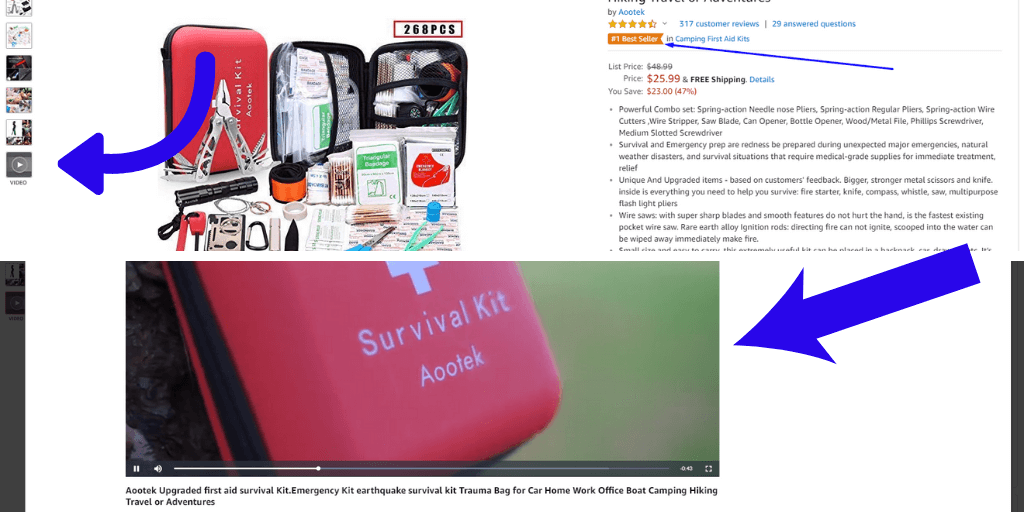
Explainer videos demonstrate real-world utility, overcome product objections, and increase on-page dwell time. Increasing conversion rates via video assets accelerates organic search rank placement, reducing overall dependency on paid ad traffic to sustain sales volume.

![Seller Central vs Vendor Central [COMPARISON]](https://www.sourceapproach.com/wp-content/uploads/2026/02/Amazon-Seller-Central-vs-Amazon-Vendor-Central-The-Source-Approach-eCommerce-Fractional-CMO-Amazon-Consultant-eCommerce-Consultant.png)
![How To Drive External Traffic To Amazon Listings [GUIDE]](https://www.sourceapproach.com/wp-content/uploads/2025/07/How-To-Drive-External-Traffic-To-Amazon-Featured-Image-The-Source-Approach-Amazon-Consultant-eCommerce-Consultant-Fractional-CMO.png)

![How to Switch From FBA to FBM [Step By Step]](https://www.sourceapproach.com/wp-content/uploads/2025/07/How-to-Switch-From-FBA-to-FBM-The-Source-Approach-Amazon-Consultant-eCommerce-Consultant-Fractional-CMO.png)



![Amazon Storefront Design Templates [EXAMPLES]](https://www.sourceapproach.com/wp-content/uploads/2023/11/Amazon-Storefront-Templates-Source-Approach-Amazon-Consultant-eCommerce-Consultant-Fractional-CMO.png)