
Key Takeaways
- Getting Amazon product reviews without violating Amazon’s TOS is difficult, but you can get reviews on Amazon with time-tested, proven tactics as well as cutting-edge.
- Amazon product reviews influence sales, click-through rates, product rankings, PPC performance and more.
- Get your first Amazon product reviews and get Amazon reviews on existing products with these 10 methods.
In over 10 years as an eCommerce Fractional CMO, Amazon Consultant, and eCommerce Marketing Consultant, not to mention CEO, I’ve seen just about every mistake and the lessons from them. That means you get all the learnings without the scars.
The ability to get reviews on Amazon from Amazon reviewers without violating Amazon’s terms of service can be like counting grains of sand on a beach. Difficult & time-consuming.
The average customer product review rate on Amazon is about 1-2%.
The good news? Getting Amazon customer reviews doesn’t have to be that hard.
I’m going to show you EXACTLY what to do for Amazon Seller Central Sellers, Amazon Vendor Central Sellers and those selling Amazon B2B that you can actually do today and that won’t violate Amazon’s TOS.
This is how to ask customers for reviews on Amazon:
Email Launch Lists
It’s no secret that an email list is your most powerful tool in eCommerce. It’s owned traffic in that it doesn’t cost you an extra penny to continually market to with the goal of getting Amazon customer reviews.
But did you know that when it comes to getting Amazon reviews that it’s also your secret weapon?
When I’m working with my Amazon Consulting clients, this is t typically where we start.
Here is how it works:
How Email Launch Lists Get Amazon Product Reviews:
- Prior to you even launching your product, you start by building a buzz online.
- You send people to a landing page where in exchange for their email address, they receive something of value to them. A free report, a guide, a book, etc.
- Leading up to your launch, you continually give them value and hype them up about your product launch.
- When it launches, you let them know and link to your Amazon product listing to buy.
- These customers are your early adopters and have the strongest relationship with you. Therefore they’re the MOST LIKELY to leave a review.
You see how powerful that is to get Amazon reviews?
But wait, there’s more…
Product Inserts
Even if you are doing Seller Fulfilled Prime this applies to you.
When is the best time to ask for a review from Amazon reviewers?
In my 15 years of Amazon Consulting Services, it’s right when they receive the product.
You know that feeling you get when you receive something in the mail, it’s like a present!
You have a little smile going, you have that excited feeling in the pit of your stomach as you admire the packaging and open it up.
But that’s just part of the story.
Then you open the packaging and check out what’s inside.
This is the best time to influence a customer and get your marketing messages across to them. They are riding high on just receiving the product while anticipating using your product and whatever problem it solves for them.
This is where you include a product insert that asks for an Amazon customer review.
You have a few goals with a product insert.
Goals of a Product Insert To Get Amazon Product Reviews:
- Ask for an honest review
- Offer a coupon or an incentive for return purchases
- Limit returns by ensuring the customer knows how to get the most out of your product.

This in and of itself will not get you in trouble with Amazon Seller Support and the TOS but you want to make sure you are not violating Amazons’ communication guidelines trying to get Amazon reviews.
| The “DO NOT” List for Inserts |
|---|
| Include Logos that display your URL. |
| Include “IF” statements: “If you love your product, please leave a review.” |
| Include leading words like “happy”, “satisfied”, “positive”. |
| Include language that incentivizes or manipulates product reviews (e.g., “Get one free for a review”). |
| Include marketing or promotional messaging of any kind. |
Here is an example of good verbiage in a product insert.
Amazon Product Insert Example Verbiage:
THANK YOU Section:
“THANKS, HERE’S A COUPON!
Thank you for your order! Here’s a Coupon Code for 25% OFF your next order!”
UGC (User Generated Content) Section:
“ENTER OUR GIVEAWAY!
Post a pic of you using your Brand Name Meat Tenderizer Tool and tag @yourusername and use #yourhashtag and we’ll feature you and enter you into our monthly GIVEAWAY!”
REVIEW Section:
“YOU CAN MAKE A DIFFERENCE WITH A REVIEW!
We’re a family-owned business, so your honest review of our product and us as a seller means the world to us. Here’s how:
1) Log into Amazon and visit your orders.
2) Click ‘Write a product review’ and leave the review.
3) Then click ‘Leave Seller Feedback’ and leave the feedback.”
There are other ways to direct customers off of Amazon to get Amazon product reviews that won’t violate Amazon’s TOS.
Free Product/Free Gift Funnel
If you’re thinking that incentivizing a product review is against Amazon’s TOS then you’d be right.
But, that’s not what this is.
Companies like GetReviews have a clever solution to getting Amazon reviews and acquiring customer data like names, emails, addresses and more.
Here’s how it works.
- You place a sticker on your packaging or an insert in your product with a QR Code and a website URL on it.
- It encourages customers to visit the website to claim their free product or free gift.
- The customer visits the website and is requested to enter their email address, name and address to get their freebie.
- Along the way, they are asked for feedback on the product they bought from Amazon. It is clear to the customer they don’t have to leave feedback to receive their freebie.
- If the feedback is good, they offer a special link the customer can click to leave an Amazon product review.
- If the feedback is bad, they offer a means to contact the brands’ customer service.
This doesn’t violate Amazon’s TOS because you aren’t requiring the customer to leave an Amazon product review to get the freebie.
You also aren’t requesting positive feedback specifically.
Speaking of product packaging inserts, let’s talk about how product packaging itself can help you get Amazon product reviews.
Product Packaging
Did you know, that premium product packaging does a lot more than get more Amazon reviews?
Benefits of Investing in Quality Product Packaging:
- Increases Brand Credibility
- Decreases Buyer Remorse
- Limits Returns
- Increases Product Reviews
- & More
Product packaging helps you get Amazon customer reviews because it helps the customers understand the value of your product through visual and tactile interaction.
If the product packaging feels and looks cheap it does not enhance the experience and limits the connection with your brand.
PLUS, I can tell you as a consultant for Amazon this is prime real estate, you can do whatever you want with your product packaging.
How Product Packaging Adds Value:
- Invite the customer in
- Tell them what to expect
- Tell them how to use the product
- Ask for a review
- Give a coupon
- Upsell & Cross-Sell other products
- & more

Want to sweeten the deal?
The nicer your packaging, the fewer returns you will get!
But let’s say you’re already selling on Amazon and your inventory is already in Amazon FBA fulfillment centers.
Or, you’re using FBA Small and Light.
What does this mean for you? How do you get Amazon reviews from Amazon reviewers when your products are already out there selling?
Amazon Request A Review Button
What is the Amazon Request A Review Button?
The Amazon Request A Review Button appears on the Orders page and lets Amazon Sellers request a review with a preset message by Amazon via the Buyer-Seller Messaging platform.
Getting reviews on Amazon recently became much easier through the implementation of the Request A Review button right in Amazon Seller Central.
The Request A Review Button helps you get Amazon reviews by using a pre-defined message that comes directly from Amazon to request a review.
The Amazon Request A Review button is compliant with Amazons Customer Communication Guidelines.
You cannot customize the review request to get reviews on Amazon.
This is what the Amazon Request A Review looks like:

How To Use The Amazon Request A Review Button:
- Log Into Seller Central
- Click on Orders in your main navigation
- Head to the Shipped Tab
- Click on the Order Number which is a link for one of your orders
- You will see a “Request a Review” button on the right-hand side
- Click the button and then click Yes
Email Follow Up Sequences
You probably know that you don’t have access to your Amazon customers’ email addresses.
But, did you know that Amazon Seller Central Sellers can still email their customers to get Amazon reviews?
This is how to ask customers for an Amazon review and not violate Amazon’s communication guidelines.
So how do you actually do this?
Popular Amazon software tools like Helium 10, Jungle Scout & more offer follow-up email sequences that you can use that will automate the Amazon Request a Review Button for you.
You will want to make sure you do not violate Amazon’s communication guidelines here either.

What if I am a Vendor Central Seller? How can I get Amazon reviews?
Good news.
You’re not left out, the added benefit of the partnership with Amazon makes things more straight forward to get more Amazon reviews from Amazon reviewers.
Here’s how…
Amazon Vine
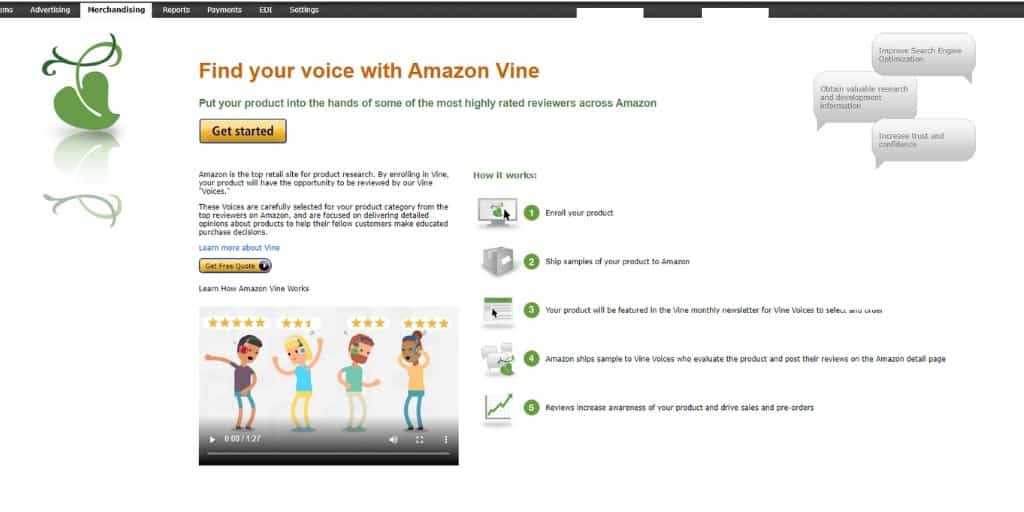
What is Amazon Vine?
Amazon Vine helps get Amazon reviews by allowing sellers to send samples to Amazon, which Amazon then distributes to their top Amazon reviewers called Vine Voice.
How Does Amazon Vine Work?
- You enroll in Amazon Vine through Vendor Central under Merchandising or if you are a Brand Registered Seller Central Seller on Brand Registry 2.0 Beta, under Advertising.
- Fees are FREE
- You select how many samples you want to send to Amazon Reviewers. (This would be between 10 and 100 units depending on the product category)
- You send in the samples to Amazon. Not the Amazon Reviewers.
- Amazon makes the Amazon Reviewers aware that your product is eligible to review through their Vine Voice Newsletter and other channels.
- The Amazon Reviewer decides to review your product and then leaves a review.
Product Testers
Product testing companies like FBA Reviews offer a way to get verified reviews on Amazon safely and compliantly.
Here’s how it works:
- You sign up for a package with FBA Reviews.
- They make the product available to their pre-screened community of Amazon product reviewers.
- The product reviewers search, find and buy your products on Amazon, test them and review them.
The reason this doesn’t violate Amazon’s TOS is that:
- You aren’t incentivizing a review.
- You aren’t communicating with the product tester.
- You aren’t guaranteed a review, just like Amazon Vine.
- You aren’t reimbursing a customer after they leave a review. FBA Reviews reimburses customers for their purchases regardless.
That said, there is a great way for both Vendor Central Sellers and Seller Central Sellers to get Amazon reviews by contacting customers outside of Amazon’s system and it perfectly adheres to Amazon’s communication guidelines TOS.
Facebook Messenger Funnels
Imagine being able to reach out to customers directly to get Amazon reviews without violating Amazons TOS.
Wouldn’t that be great?
Well, you can!
Enter Landing Cube.
Landing Cube helps you get Amazon reviews by getting them subscribed to your email list or Facebook Messenger subscriptions before they head to Amazon to purchase your products.
You know you need to send traffic from OFF of Amazon ONTO Amazon to drive your sales.
So you are already trying to grow your email list, Facebook Messenger list and build your brand off of Amazon anyway.
Here’s how you can do this yourself:
How To Contact Customers Directly To Get Reviews on Amazon:
- Instead of driving traffic from your Social Media, Google Ads, Facebook Ads, Blog Posts, YouTube, etc. directly to Amazon, you direct them to a landing page on your site specifically designed to collect your customers’ information, pre-sell your product, then ship them off to Amazon to buy.
- Landing Cube helps you with this AND gets them signed up to your email list or Facebook Messenger.
- Now they’re “your” customers and not just Amazons, so Landing Cube’s automated tools can follow up with your customers to get reviews on Amazon for you without violating TOS.
Landing Cube takes a proven tactic that you’re doing anyway to the next level to get Amazon reviews and grow your Amazon sales.
But what about the types of customers you are targeting?
There is another way to get Amazon Reviews that involves the types of customers you target.
Let me explain…
Targeting Passionate Enthusiasts
At my eCommerce Consultancy, I’ve always had a secret weapon when it comes to how to get Amazon reviews.
Target passionate enthusiasts.
Since they are passionate about your subject matter, they are more likely to leave product reviews than the average consumer on Amazon.
How Passionate Enthusiasts Help You Get Amazon Product Reviews:
- Enthusiasts are passionate
- They tell everyone about things they like
- They purchase repeatedly from brands
- They leave feedback
- They leave positive feedback
You see the power in this right?
You want people like this buying your products on Amazon because this will help you get reviews on Amazon.
I guarantee whatever niche you are in, you have enthusiasts.
Focus on them and reviews will flood in and that rising tide will raise all ships because the great seller metrics and sales velocity you build focusing on those folks, makes you more visible and appealing for the broader customers.
What Not To Do To Get Amazon Reviews
To keep yourself protected, these are the things you do not want to do to get Amazon Reviews.
Do Not Violate Amazons Communication Guidelines
In my experience, Amazon consistently gets more strict month to month about crawling buyer-seller communications and handing out temporary suspensions of buyer outreach priviliges.
That said, here is how to not violate Amazons Communication Guidelines.
| DO | DO NOT |
|---|---|
| Message a buyer with messaging needed to complete an order. | Send more than one request for a review or seller feedback. |
| Message a buyer to respond to a customer service inquiry. | Send more than 2 communications to the buyer in total. |
| Message a buyer with a canned request from the Amazon Request A Review Button. | Include Logos that display your URL or link to your website. |
| Include language that incentivizes reviews. |
Do Not Use Incentives To Get Amazon Reviews
Anything that incentivizes a person to leave a review, avoid at all costs.
This includes but is not limited to:
- Contests
- Freebies
- Discounts
- Asking people who haven’t bought or tried the product to review your product
- Asking people to leave a good / positive review in any way (don’t try to get creative with your verbiage)
- You, friends or family reviewing your own products
- Using manipulative language such as: “we’re a small family-owned business”
How To Get Amazon Reviews – INFOGRAPHIC
Frequently Asked Questions
How To Delete Amazon Reviews? (AKA: How To Remove Amazon Reviews)
Unfortunately, you cannot simply delete Amazon reviews. You can reach out via the Contact Customer tool in Seller Central to resolve issues, report abuse if the review violates guidelines, or dispute it via Amazon Seller Support. You can also email [email protected] to plead your case.
Can I Export My Amazon Reviews?
Amazon does not provide a 1st party way to do this. There are Chrome Extensions that can help with this task.
Can I Use My Amazon Reviews On My Website?
Technically, no, Amazon is very clear that they are Amazon’s reviews and not yours. You need permission from the reviewer to use the review elsewhere, although many folks still choose to do this anyway.
Can I Get Amazon Reviews From Customers That Didn’t Purchase?
Yes, but they will not show as “Verified Purchase” reviews, which carry less weight.
Does The Quantity and Quality of Amazon Reviews Impact My SEO?
Yes. Review quantity and quality directly impacts your Amazon CTR and conversion rate, which are major ranking factors.
Can Amazon Reviews Help Me With The Buy Box?
Yes, Seller Ratings (feedback on your account), not just product reviews, can help you win the Amazon Buy Box.


![Seller Central vs Vendor Central [COMPARISON]](https://www.sourceapproach.com/wp-content/uploads/2026/02/Amazon-Seller-Central-vs-Amazon-Vendor-Central-The-Source-Approach-eCommerce-Fractional-CMO-Amazon-Consultant-eCommerce-Consultant.png)
![How To Drive External Traffic To Amazon Listings [GUIDE]](https://www.sourceapproach.com/wp-content/uploads/2025/07/How-To-Drive-External-Traffic-To-Amazon-Featured-Image-The-Source-Approach-Amazon-Consultant-eCommerce-Consultant-Fractional-CMO.png)
![How to Switch From FBA to FBM [Step By Step]](https://www.sourceapproach.com/wp-content/uploads/2025/07/How-to-Switch-From-FBA-to-FBM-The-Source-Approach-Amazon-Consultant-eCommerce-Consultant-Fractional-CMO.png)

![Amazon Storefront Design Templates [EXAMPLES]](https://www.sourceapproach.com/wp-content/uploads/2023/11/Amazon-Storefront-Templates-Source-Approach-Amazon-Consultant-eCommerce-Consultant-Fractional-CMO.png)