
Key Takeaways
- How to deal with Amazon Seller Support? First, accept that Amazon Seller Support is bad. Most Amazon Sellers devote about 10 – 15% of their time each week to dealing with Amazon Seller Support.
- Amazon Seller Support and Brand Registry Support can be contacted through Seller Central or the Brand Registry Portal, but it’s not always easy.
- There are certain best practices that will reduce the number of times it takes to contact Amazon Seller Support to resolve an issue.
In over 10 years as an eCommerce Fractional CMO, Amazon Consultant, and eCommerce Marketing Consultant, not to mention CEO, I’ve seen just about every mistake and the lessons from them. That means you get all the learnings without the scars.
Amazon Seller Support rarely gets it right the first time and takes up a lot of our time dealing with them.
Luckily, there are best practices you can follow to make your life much easier and save yourself a ton of time.
These are my best tips from over the years with dealing with Amazon Seller Support.
Why Is Amazon Seller Support So Bad?
Why is seller support so bad?
Amazon Seller Support is so bad because of a lack of information provided to their representatives.
Amazon Seller Support agents are not trained in all things Amazon, rather small, fractured segments.
This contributes to the most common pain points with Amazon Seller Support.
| Common Pain Points |
|---|
| Not responding to cases at all. |
| Responding with canned responses that ignore your inquiry. |
| Responding with inaccurate or outdated information. |
| Language barriers. |
| Routing you to help articles instead of a human. |
| Cannot find your issue in the triage tree. |
| Cannot call or email Seller Support directly (must use triage). |
As a consultant for Amazon I can tell you that since most of the Amazon Seller Support agents you interact with are not trained in additional subject matter, questions are often misunderstood.
For instance, you will contact Amazon Seller Support asking why your ads are not showing and they will respond saying you need to increase your bids, but in actuality, you need to add those keywords that you are trying to advertise on to your listing.
Since they are not trained in Amazon SEO beyond the basics, they wouldn’t know to tell you this because the segment of Amazon Seller Support you are dealing with are focused only on Ads.
The same is true for all departments.

They are not trained in things like: Amazon Influencers, Amazon Listing Optimization & more.
This consistently leads to Amazon Sellers contacting Amazon Seller Support and asking them about an issue and the Amazon Seller Support will repeat the concern back to the Amazon Seller in a way that makes it clear that the Amazon Seller Support agent does not understand your inquiry.
What’s more, since you cannot call them directly or email them directly, you need to go through a triage that regularly attempts to route you to help articles or listing tools when you are trying to speak to a person.
That said, how do you contact Amazon Seller Support?
How To Contact Amazon Seller Support
How do you contact Amazon Seller Support?
There is no phone number to contact Amazon Seller Support directly. There is no email to contact Amazon Seller Support directly. Amazon Sellers are routed through a triage system to contact Amazon Seller Support.

You have the following options to contact Amazon Seller Support from the triage:
- A number of tools to help you solve your problem
- Help articles to help you solve your problem
- Email a ticket to Amazon Seller Support
- Receive a call instantly from Amazon Seller Support by entering your phone number and then get entered into the Amazon Seller Support call queue.
Here are the steps to contact Amazon Seller Support:
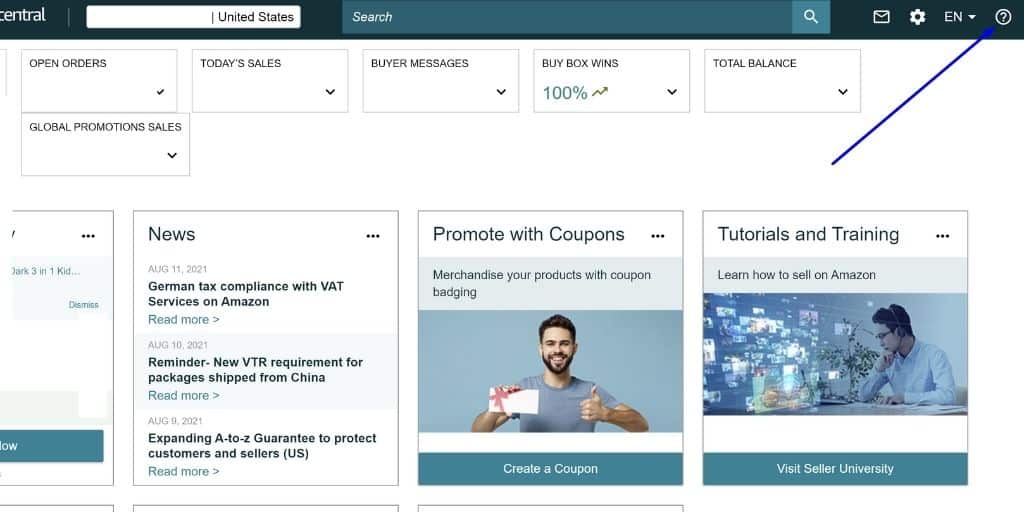
1. Click the question mark help icon at the top right of Amazon Seller Central.
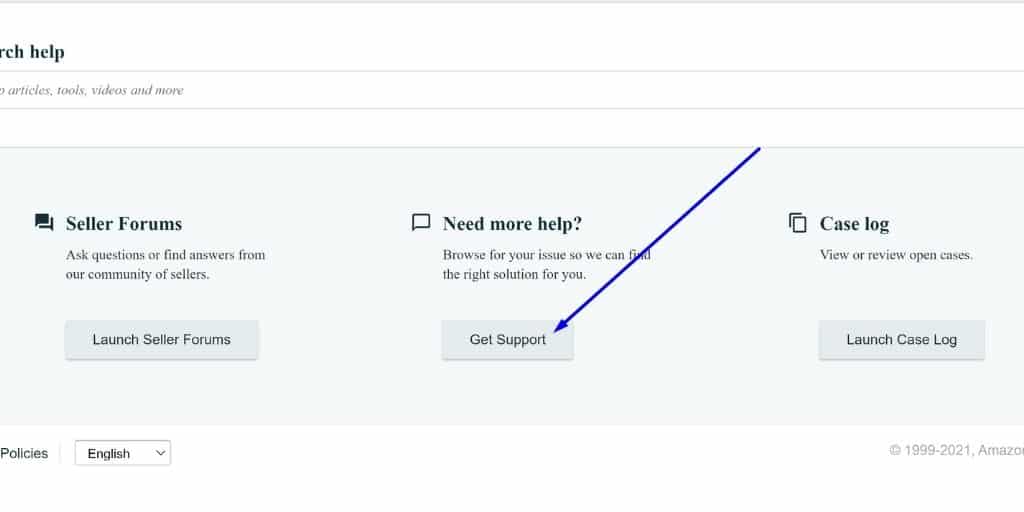
2. Scroll down and click “Get Support”.
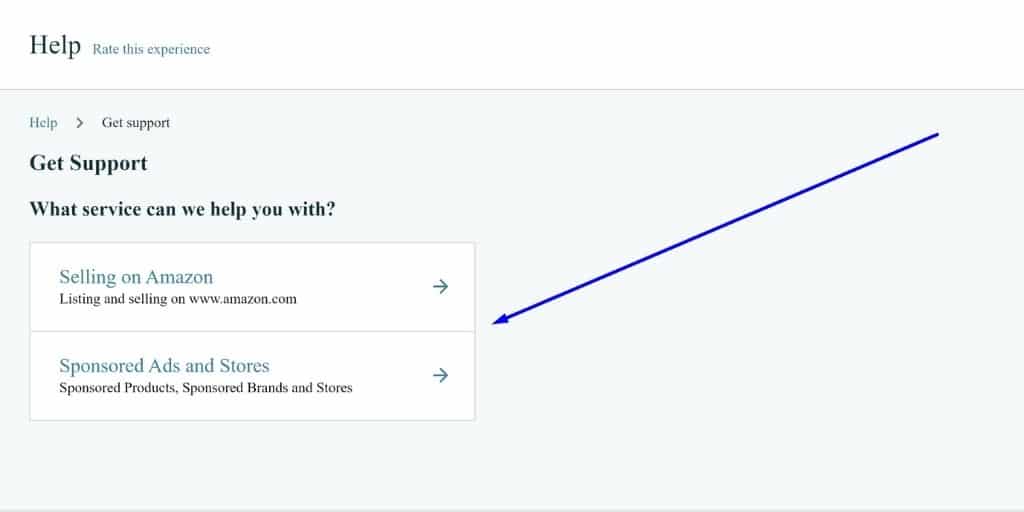
3. Begin making your selections in the triage.
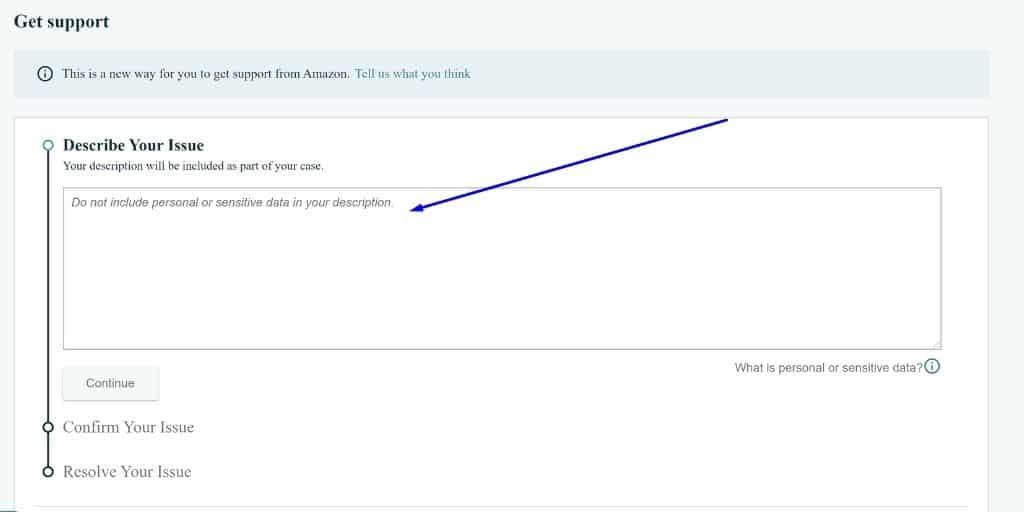
4. Describe your issue in a general sense and hit Continue.
- When describing your issue, you want to be somewhat vague so that the rest of the triage routes you to the option to Email or receive a Call from a human.
- NOTE: Copy your initial description of your issue on your clipboard in case you need to adjust it later.
- You will notice that depending on what you type in, you can get routed to a tool, a help article or continue on the track to contact a human.
- You will typically make a few alterations to describing your issue until you get sent down the right track to contact a human.
5. Select “My Issue is Not Listed”
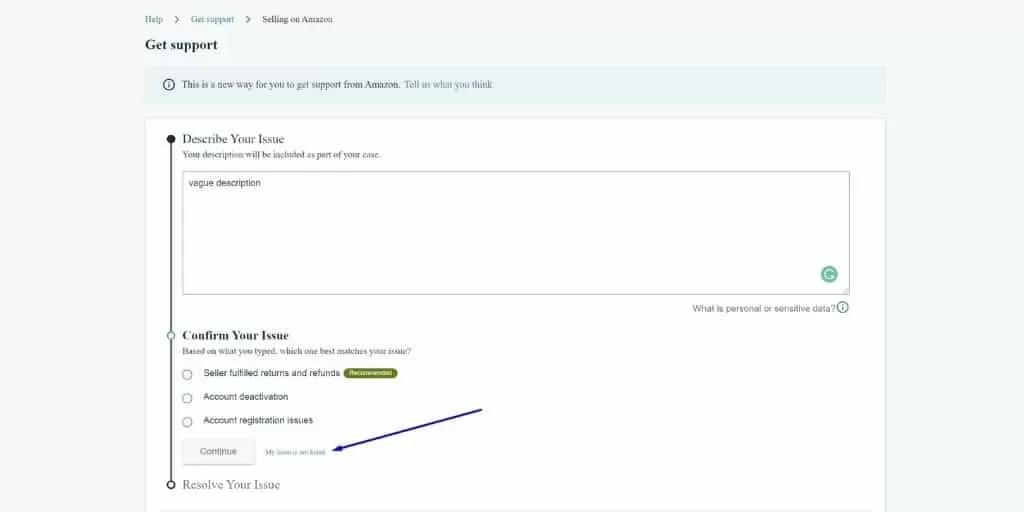
6. Select the general category for your issue and hit Continue.
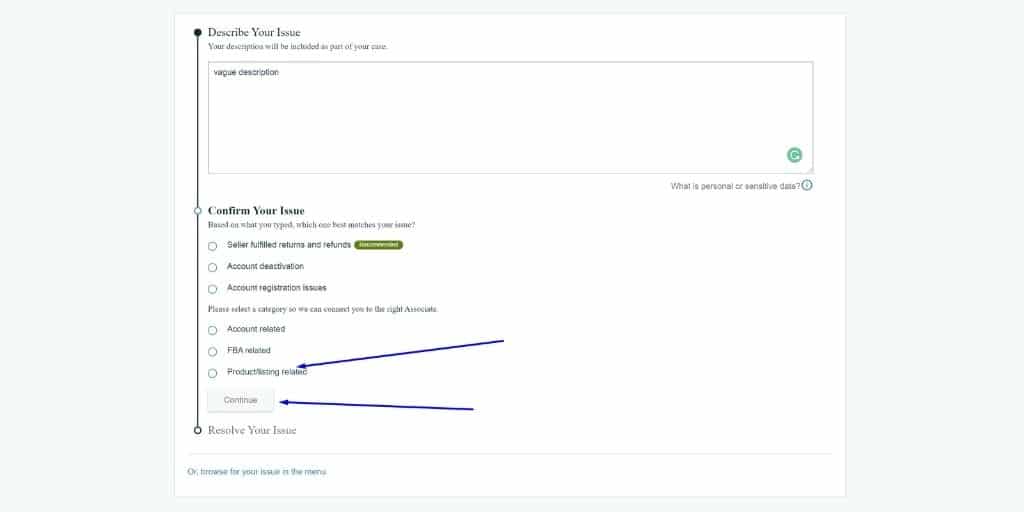
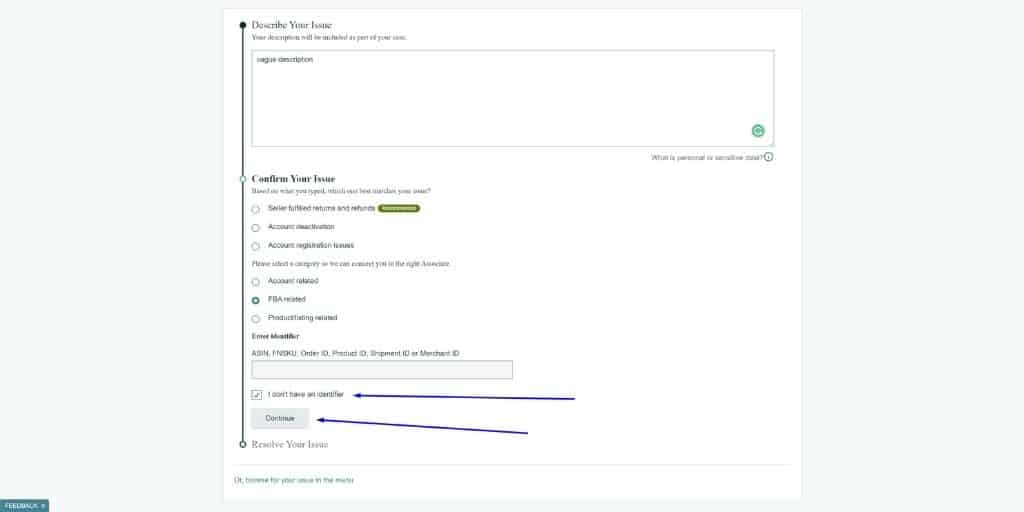
7. Select I don’t have an identifier and click Continue.
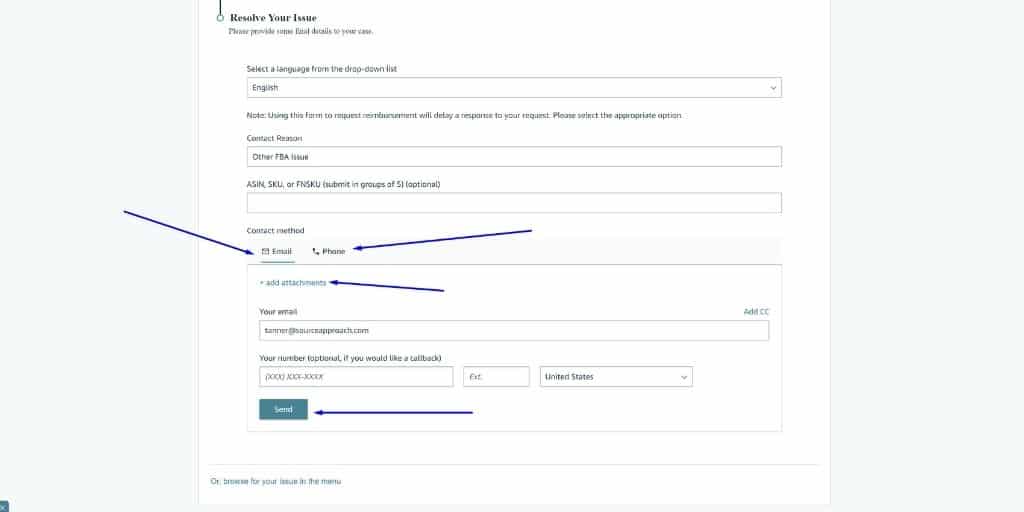
8. Select Email if you want to open up a ticket via email, select Phone if you want them to call you, upload your screenshots supporting your issue, then enter your email and phone and hit Send.
- NOTE: Being as literal as possible makes things easier, provide as many screenshots of what your challenge is as you can.
Speaking of adding screenshots, there are a number of tips and tricks I’ve picked up over the last decade or so that will help you when dealing with Amazon Seller Support.
Top 10 Tips To Deal With Amazon Seller Support
Everyone knows that dealing with Amazon Seller Support is painful. I can speak from personal experience providing Amazon Consulting Services. That’s why it’s vital to follow some simple tips and tricks that will make your life easier.
1. Take Screenshots of Everything
If you’re dealing with an error or trying to articulate something you are trying to do in Amazon Seller Central or Amazon Vendor Central, make sure you’ve taken a screenshot. Amazon Seller Support reps are not trained in every screen and error and often have to look things up in real-time, so they will likely not be familiar with what you are trying to convey.
2. Set Calendar Reminders To Respond To Cases
The momentum you’ve built up will be lost if Amazon closes a case on you. I can’t tell you how many times I’ve seen tickets closed due to no response of the seller simply due to being very busy and couldn’t get back to it in time.
3. If You Do Need To Create A New Case, Reference The Previous Case ID
In my experience, Amazon Seller Support will not look at your other cases for context unless you specifically tell them to and give them the exact case ID that you are referring to.
4. If You’re Brand Registered, Use The Brand Registry Portal To Open Cases
The fact is that Brand Registry Support is superior to Seller Support when it comes to efficacy and timeliness.
5. If You Initiate A Call, Upload Supporting Documentation and Screenshots While You’re On The Phone With Amazon Seller Support
When you initiate a ticket via phone call, head to your case log and reply to the ticket that was just created from “inbound contact” and send in screenshots and supporting documentation.
6. Use The Right Terminology
Apart from being as polite as possible, you can specifically appeal to the Amazon Seller Support reps corporate training to accomplish your goals.
| DO NOT SAY | DO SAY |
|---|---|
| “Fix this because I’m losing sales.” | “Please fix this because it is creating a negative customer experience.” |
| “You didn’t read my question.” | “Will you please take ownership of this issue and help me resolve it?” |
7. Don’t Tell A Support Rep To Read Back In The Case, Copy and Paste and Surface The Details In The Most Recent Response
It is generally accepted that Amazon Seller Support reps do not read through the entirety of case history. Instead, copy and paste the details that you need them to know if your reply.

8. Initiate A Call At The Right Time For US or South American Support
In my experience, initiating a phone call after 5pm EST ensures you speak with a US or South American-based Amazon Seller Support rep. This is because Indian Standard Time is 9 hours and 30 minutes ahead of Eastern Standard Time.
9. For Amazon FBA Issues, Ask To Speak To The “Captive FBA Team” For Skilled Support
Amazon refers to its US and Costa Rican support reps as the “Captive” team. These Seller Support reps receive the most training and are equipped to deal with the most challenging issues that Amazon sellers face. If you are selling via Amazon FBA, this is a great option for you.
10. Let Seller Support Know What You’ve Already Tried To Resolve The Problem To Expedite A Resolution
One of the most common frustrations I see is having an urgent issue and getting a response back from Amazon Seller Support that instructs you to do something you’ve already done. To avoid this, be clear in the Case on what you’ve already attempted to resolve the situation.

With tips and tricks covered, these are the most frequently asked questions I’ve seen in Amazon Consulting in regard to Amazon Seller Support.
The Best Way To Deal With Amazon Seller Support
The truth is, in my experience as an Amazon Seller Consultant, the best way to deal with Amazon Seller Support is to not let it take up all your time and bandwidth.
Enter, Seller Candy.
If you’ve ever wished you could outsource all of your Seller Central tasks to a team of experts, then Seller Candy is for you. They know how to navigate the complexities of Seller Support and will stay on top of tasks to make sure nothing slips through the cracks.
Stop guessing with inexperienced in-house teams or renting results from agencies & freelancers. Start owning your growth.
Your teams drift into chaos when they operate in silos. You need a Marketing Operating System to govern them.
Whether you need an Amazon Consultant to protect margins, an eCommerce Marketing Consultant to architect your roadmap, or a Fractional CMO for eCommerce to orchestrate the execution, I install the Brand Source OS—your single source of truth for AI, strategy, and alignment.
Get an instant quote or book a call.
Frequently Asked Questions
How to Call Amazon Seller Support
You can call Amazon seller support by initiating a seller support ticket and select the option for them to call you when submitting your ticket instead of email.
Can Amazon Seller Support Help Me Remove Unauthorized Sellers?
In How To Remove an Unauthorized Seller on Amazon, I mention that contacting Seller Support is one of the steps after you’ve already brand registered, and have already reached out to them yourself.
Why Is Amazon Seller Support So Bad?
Amazon Seller Support is so bad because of compartmentalization and knowledge dilution along the workforce hierarchy.
Since Amazon is aware of this, they created SAS Core. SAS Core is a paid Seller Support service from Amazon that costs $1,600/month + 0.3% of your total sales. With SAS Core, you get access to a tier 1 support rep with access to areas of Seller Central that the base level Amazon Seller Support doesn’t have access to.
Where is Amazon Seller Support Located?
Seattle, North Dakota, India, and Costa Rica.
How Can I Contact A Supervisor or Manager?
You can request a supervisor or manager call back. This is typically initiated via Phone support.
Is Amazon Seller Support 24 / 7?
Yes, since Amazon has call centers all around the world in various time zones, they are suited to be responsive around the clock.
Can You Call Amazon Seller Support?
No, but you can initiate a call with them via their triage.
What is Amazon Seller Supports Email?
There isn’t an email address for Amazon Seller Support. [email protected] can be used to help with Amazon Reviews and feedback-related issues.
Amazon Seller Support Phone Number
There isn’t one.
How To Contact Amazon Seller Support By Phone?
You can initiate a call through their triage.
Can Amazon Seller Support Help Me Sell More?
No, Amazon Seller Support reps are not trained to help you increase sales on Amazon.
Can Amazon Seller Support Help My Products Rank Higher?
No, Amazon Seller Support reps are not trained in marketing disciplines like: Amazon SEO. Amazon Listing Optimization or Amazon Influencers.
Can Amazon Seller Support Help Me Get Into Seller Fulfilled Prime Quicker?
No, Amazon Seller Support reps cannot help with Amazon Seller Fulfilled Prime graduations.
What’s The Best Way To Deal With Amazon Seller Support?
Check out the next section of this blog post.


![Seller Central vs Vendor Central [COMPARISON]](https://www.sourceapproach.com/wp-content/uploads/2026/02/Amazon-Seller-Central-vs-Amazon-Vendor-Central-The-Source-Approach-eCommerce-Fractional-CMO-Amazon-Consultant-eCommerce-Consultant.png)
![How To Drive External Traffic To Amazon Listings [GUIDE]](https://www.sourceapproach.com/wp-content/uploads/2025/07/How-To-Drive-External-Traffic-To-Amazon-Featured-Image-The-Source-Approach-Amazon-Consultant-eCommerce-Consultant-Fractional-CMO.png)

![How to Switch From FBA to FBM [Step By Step]](https://www.sourceapproach.com/wp-content/uploads/2025/07/How-to-Switch-From-FBA-to-FBM-The-Source-Approach-Amazon-Consultant-eCommerce-Consultant-Fractional-CMO.png)



![Amazon Storefront Design Templates [EXAMPLES]](https://www.sourceapproach.com/wp-content/uploads/2023/11/Amazon-Storefront-Templates-Source-Approach-Amazon-Consultant-eCommerce-Consultant-Fractional-CMO.png)