
Key Takeaways
- When products are unavailable for order from in-stock FBA inventory, they are set in “reserved” status.
- Inventory in reserved status could be customer orders, inventory moving from one fulfillment center to another (FC Transfer), or fulfillment center processing (product inspection/measuring).
- When inventory is unavailable for sale in reserved status on FBA, it can impact Amazon Sellers in many ways, from winning the Buy Box to losing sales velocity momentum.
In over 10 years as an eCommerce Fractional CMO, Amazon Consultant, and eCommerce Marketing Consultant, not to mention CEO, I’ve seen just about every mistake and the lessons from them. That means you get all the learnings without the scars.
Reserved status in Amazon FBA inventory can cause shivers down the spine of an Amazon FBA seller, especially if there are issues with their products or worse.
Why are they “reserved”?
I know the panic, stress and frustration this can cause.
That’s why I put together this in-depth guide on what reserved means in Amazon FBA inventory so you know what it is and how it impacts you as an Amazon Seller Central seller using Amazon FBA and even selling Amazon B2B with FBA.
What Does Reserved Mean Amazon FBA?
Reserved inventory are products within an Amazon seller’s FBA inventory that are temporarily inaccessible for fulfillment due to various reasons. This can include recent customer orders, fulfillment center transfers or fulfillment center processing.
When you’re browsing “Manage Inventory” in Seller Central and click on the number of inventory you have available at Amazon FBA, you will see this box appear:
FBA Reserved Inventory Example:
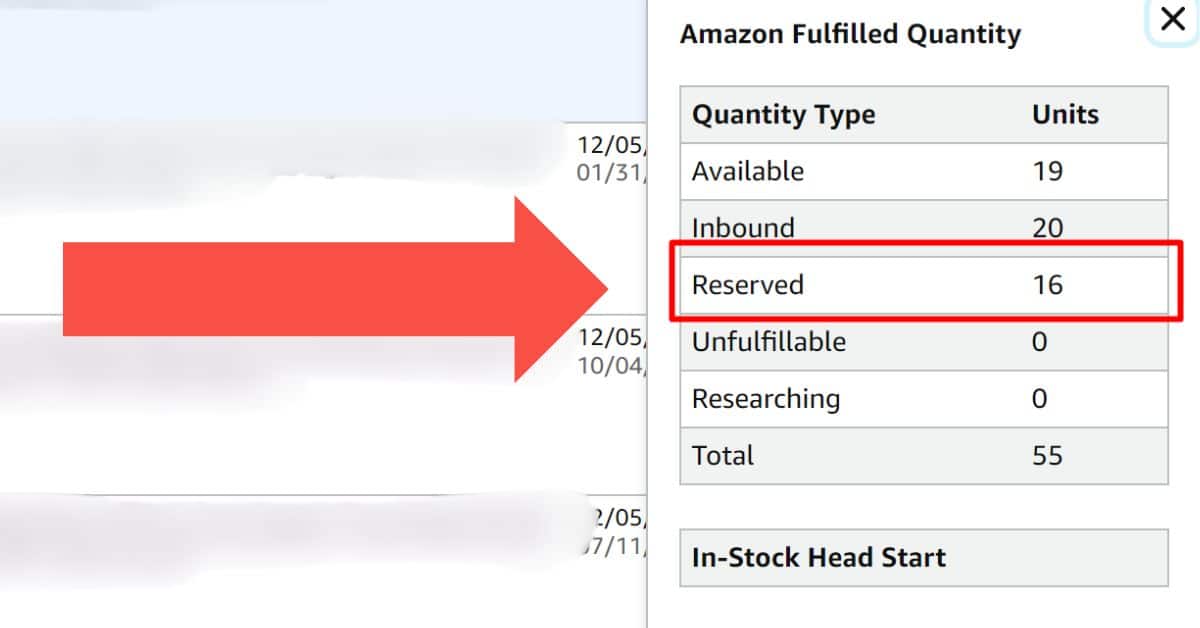
In this case, you can see 16 units of reserved inventory.
To see which category of reserved inventory you’re dealing with, you’ll want to head to:
Main Navigation > Inventory > FBA Inventory
From there, you can drill down on the exact reserved status as seen here:
FBA Reserved Inventory Breakdown Example:
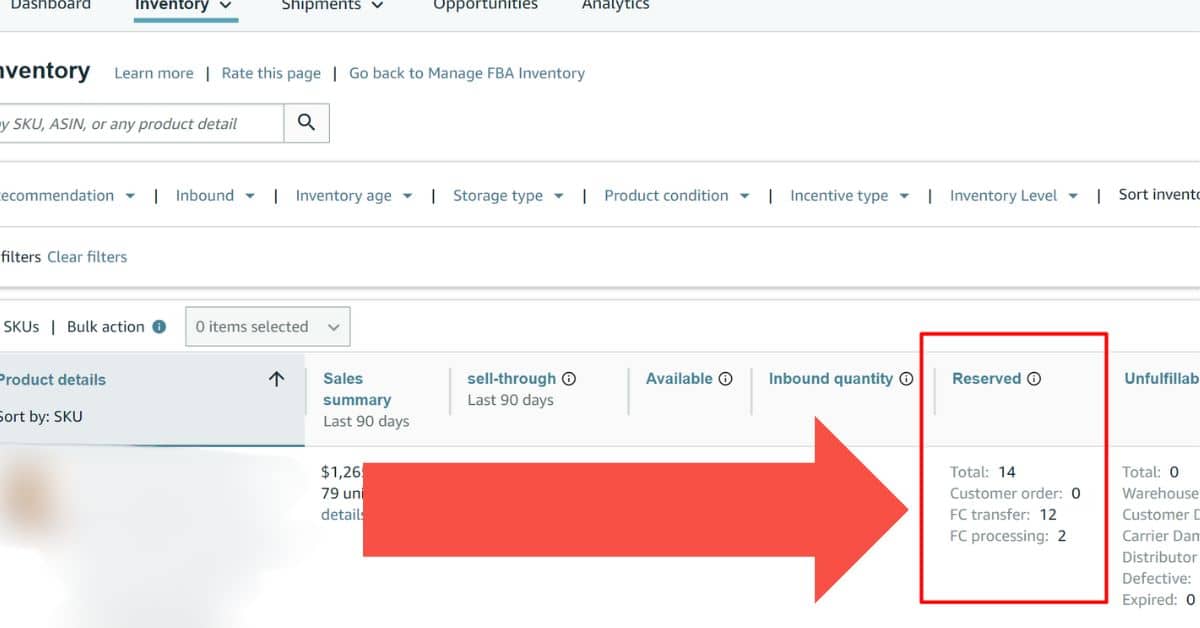
To understand why they become unsellable and in reserved FBA status, let’s break down the differences.
| Reserved Status Type | What It Means | Is It Sellable? |
|---|---|---|
| Customer Orders | Items used to fulfill a pending customer order. | No (Already Sold) |
| FC Transfer | Items moving between Amazon warehouses to spread inventory. | Yes (Backordered) |
| FC Processing | Items flagged for checking (weight, size, damage). | No (Unsellable) |
We’ll examine each status in detail below, starting with Customer Orders.

Customer Orders
Amazon FBA Reserved for Customer Orders simply put are orders from customers that haven’t been fulfilled yet and are now reserved and unsellable.
You may see “out of stock” next to your inventory in the inventory management screen but have items in reserved status that are reserved for customer order.
That means, customers have ordered the last of your inventory but are still pending shipment by Amazon FBA.
This type of Amazon FBA reserved status will not affect your sales as they were available for sale and then sold.
This will impact your sell-through positively unlike the next two reserved statuses.

Fulfillment Center Transfers
Reserved status for FC Transfer or, Fulfillment Center Transfer are units in your inventory that are being moved from one fulfillment center to another.
This happens when Amazon’s demand algorithm predicts inventory demand in other regions of the country and needs to move your inventory to meet the demand.
While inventory in this Amazon FBA reserved status is still “sellable”, potential customers will see an “available on” or “ships on” date that is beyond what they would expect when using their Prime membership benefits.
As a consultant for Amazon I can attest to the fact that this can lead to lost sales which can impact sell-through.
That said, there are other reasons the Amazon FBA fulfillment center may cause reserved status.

Fulfillment Center Processing
Amazon FBA reserved inventory in Fulfillment Center Processing status is inventory being held for specific operations, such as:
- Pending scan in from a shipment
- Under investigation
- A bin check
- A cubi-scan
- Verification of sizes, weights, dimensions
- Verification of sellable inventory condition
The challenge with this particular Amazon FBA reserved status is that the inventory is not available for sale, which directly impacts your sell-through rate, thus impacting your Amazon IPI Score.
When you see inventory in this Amazon FBA reserved status, I encourage my clients to aggressively pursue a resolution with Amazon Seller Support.

Frequently Asked Questions
What is Reserved Amazon FBA?
Reserved Amazon FBA units are units of in-stock inventory that are temporarily unavailable for order by Amazon customers. This usually happens because they are being moved, processed, or have already been sold but not shipped.
Can I Create a Removal Order For Reserved Inventory?
No, you can consider the Reserved Amazon FBA inventory as “frozen” until the current processes are complete. You must wait for it to become “Available” or “Unfulfillable” before you can remove it.
How Long Does It Take for FBA Inventory to Become Available?
After your items arrive at Amazon FBA fulfillment centers, they should be scanned in and available for sale within 2 – 6 days. However, peak seasons such as the holidays (Q4) can impact these times significantly.
What is the Meaning of Reserved Inventory?
Reserved inventory is inventory that Amazon has pulled from fulfillment centers to move to another fulfillment center (FC Transfer), process for data accuracy (FC Processing), or that has been ordered by a customer but not yet shipped.
How Long Do Inventory Investigations Take?
An Amazon FBA inventory investigation can take up to 30 days to resolve.
How Long Do FC Transfers Take?
Fulfillment Center (FC) transfers typically take 1 – 5 business days, though your product is often still purchasable on backorder during this time.


![Seller Central vs Vendor Central [COMPARISON]](https://www.sourceapproach.com/wp-content/uploads/2026/02/Amazon-Seller-Central-vs-Amazon-Vendor-Central-The-Source-Approach-eCommerce-Fractional-CMO-Amazon-Consultant-eCommerce-Consultant.png)
![How To Drive External Traffic To Amazon Listings [GUIDE]](https://www.sourceapproach.com/wp-content/uploads/2025/07/How-To-Drive-External-Traffic-To-Amazon-Featured-Image-The-Source-Approach-Amazon-Consultant-eCommerce-Consultant-Fractional-CMO.png)

![How to Switch From FBA to FBM [Step By Step]](https://www.sourceapproach.com/wp-content/uploads/2025/07/How-to-Switch-From-FBA-to-FBM-The-Source-Approach-Amazon-Consultant-eCommerce-Consultant-Fractional-CMO.png)

![Amazon Storefront Design Templates [EXAMPLES]](https://www.sourceapproach.com/wp-content/uploads/2023/11/Amazon-Storefront-Templates-Source-Approach-Amazon-Consultant-eCommerce-Consultant-Fractional-CMO.png)
![Amazon Product Images Best Practices [EXAMPLES]](https://www.sourceapproach.com/wp-content/uploads/2025/07/Amazon-Product-Images-Best-Practices-The-Source-Approach-Amazon-Consultant-eCommerce-Consultant-Fractional-CMO.png)