
Key Takeaways
- Why is my eCommerce site not selling? Your online store isn’t selling because you have a traffic problem or a conversion problem.
- If your online store has no sales, it’s because you’re either not getting the right traffic if any, OR you’re missing KEY elements from your website design.
- If you have an eCommerce website with no sales, you will be able to fix your eCommerce website sales quickly & easily by following the tips in this article.
In over 10 years as an eCommerce Fractional CMO, Amazon Consultant, and eCommerce Marketing Consultant, not to mention CEO, I’ve seen just about every mistake and the lessons from them. That means you get all the learnings without the scars.
Getting sales on your eCommerce website can be like vacuuming a beach.
Difficult & time-consuming.
Trust me, I would know, I am a top-rated and award-winning eCommerce Marketing Consultant recognized by DesignRush who’s been at this 10+ years. I do this myself, selling on websites is not easy.
I have worked on/evaluated/audited /optimized hundreds of websites and I’m here to tell you that the issues of selling on websites boil down to 2 things.
I am going to break down what they are and more importantly, what you can do about it to increase your eCommerce website sales.
1) Not Getting Any or The Right Traffic
Why Are You Losing Sales? (The Diagnostic Test)
You need Buyer Intent Traffic via SEO, PPC, or Influencers.
Traffic is arriving but not buying. You lack Trust, Social Proof, or “S.A.F.E.” elements.
Seems like a good place to start right? Are people even coming to your eCommerce website?
Most eCommerce expert advice says, before you even start thinking about calculating conversion rates, you want to know if anyone is seeing your products to be able to buy them.
Here’s what to do:
- Go to Google Analytics 4
- Visits Reports
- Select Engagement, then Pages and Screens
This report will tell you what pages (or products) on your site people are viewing.
From here, you will have 3 scenarios.
1) People Aren’t Viewing Any Pages on Your Site
If you have no traffic or almost no traffic, you won’t be able to sell products.
How to fix it:
This is where you want to begin focusing on acquiring buyer intent, otherwise known as commercial traffic from sources like SEO, PPC, Influencer Marketing, and Email Marketing.
The important note here is Buyer Intent traffic. You want to focus on driving people to your website that already know they want what you sell.
Example:
- Buyer Intent: Plant Protein Powder, Vanilla, 30 Servings, Gluten Free
- Research-Based: Protein Powder
2) People Are Viewing Blog Posts, But Not Products
This means people are on your eCommerce website to read, not to buy.
How to fix it:
- Place call-to-action ads in your blog posts directing people to the products they’d most likely be interested in based on the topic of the blog post.
- Embed products into the blog posts themselves so the customer can add to the cart right from the blog post rather than having to navigate to a product page.
- Focus on getting buyer intent traffic to your product pages.
3) People Are Viewing Products, But No Sales
You have a design problem as well as a traffic problem. This means people don’t like what they see when they land and are entering the page via a traffic source that doesn’t imply they want to buy, they want to browse.
How to fix it:
- Head to Google Search Console
- Click on Performance
- Click on Pages in the Table Header
- Locate your product pages
- Click on one of the product pages
- Click on the Queries table header
These are the keywords bringing people to that product page from Google. If you see mostly generic or research-based keywords, then you need to optimize your page for buyer-intent keywords.
Your next challenge is design. Customers are viewing your products but they aren’t sure this is the right product for them nor the right place to buy the product.
The next section will tell you exactly what to do about that.
2) Design Elements Are Missing From Your Website
If your ecommerce website isn’t selling, customers are not finding what they are looking for and I do not mean products. This is what customers are looking for.
S.A.F.E
Your homepage, product category, and sub-category pages as well as your product detail pages need to make it obvious and apparent how your product:
- Solves their problems
- Alleviates their pains
- Fulfills their desires
- Engages their emotions
All of your copy, imagery, and video must be aligned to achieve this.
Agitate Pain & Problem:
Your customers are either on your website with the intent to solve their problems or alleviate their pains, or they were interrupted and drawn to your website with intrigue. Now is the time to get them across the finish line to buy by reminding them how inconvenient or painful their obstacles are.
The Dream Outcome:
Your pages need to show the customer the dream outcome of what they hope to achieve. This is also known as the idealistic self or aspirational self. Customers don’t buy what your product is, they buy what it helps the customer become.
Proof of Efficacy & Social Proof:
Significant real estate on each of your pages should be devoted to proving to the customer that your product will achieve their dream outcome.
- Reviews (Quantity & Quality)
- Testimonials (Video/Written)
- Video Evidence / Before & After
- Awards & Certifications
- Statistics, Facts & Figures
Reduce Friction:
Your shoppers should have the easiest experience you can possibly provide. To give your customers a frictionless shopping experience, make sure you offer:
- On-site Order Tracking
- All Payment Gateways / Buy Now Pay Later
- Social Logins
- Free & Fast Shipping
- Loyalty Reward Points Programs
Peace of Mind:
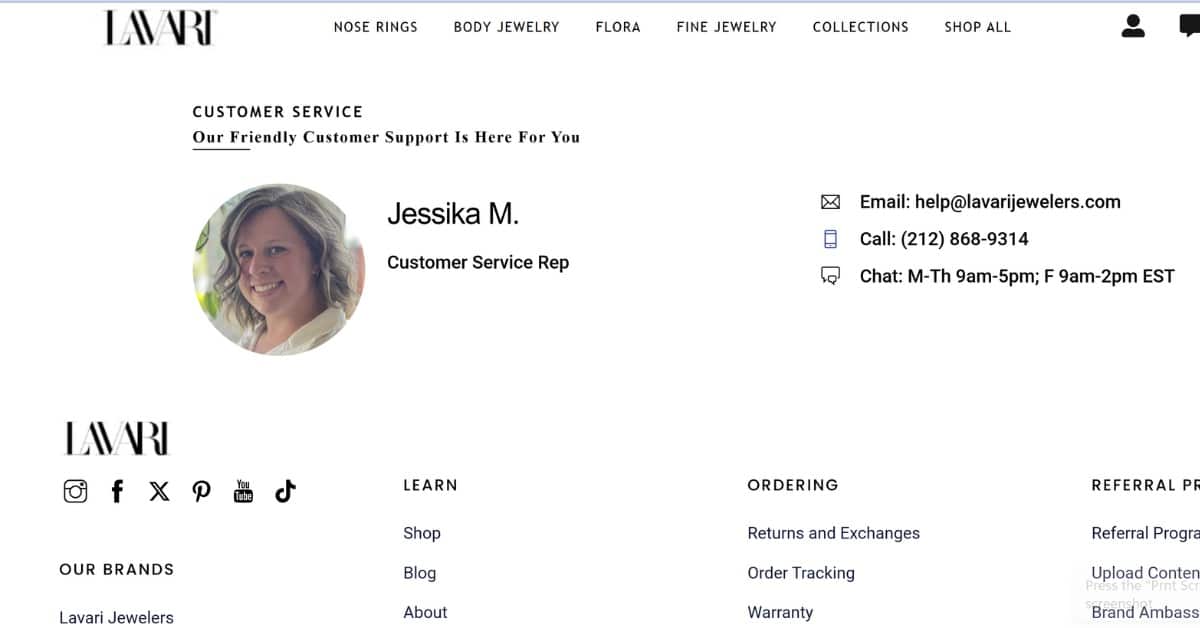
If a shopper is going to feel comfortable enough to place an order on your site, they need the peace of mind of knowing they have someone to contact in case of a problem.
A phone number in the main navigation achieves this during your first impression. But don’t stop there, at the bottom of every page, have a customer service pre-footer with:
- A profile photo
- The name of the person they can contact for customer service
- A phone number and Email
- Hours of operation
The 16 Core Human Desires:
Ohio State Professor Steven Reiss distilled our core human desires to 16. Focus on one per landing page.
| The Desire | What It Means |
|---|---|
| 1. Survival | Desire to extend life and survive. |
| 2. Enjoyment of Food | Desire to eat, drink and enjoy it. |
| 3. Freedom from Fear/Pain | Desire to avoid danger and alleviate pain. |
| 4. Sexual Companionship | Desire for romance. |
| 5. Comfortable Living | Desire for comfort in one’s dwelling. |
| 6. Superiority/Winning | Desire to increase status and self-esteem. |
| 7. Care of Loved Ones | Desire to protect family. |
| 8. Social Approval | Desire to belong and be validated. |
| 9. To Be Informed | Desire for intellectual stimulation. |
| 10. Curiosity | Desire to explore and learn. |
| 11. Cleanliness | Desire for hygiene and order. |
| 12. Efficiency | Desire for productivity and optimization. |
| 13. Convenience | Desire to save time and reduce effort. |
| 14. Dependability | Desire for trust and reliability. |
| 15. Beauty & Style | Desire for aesthetic pleasure and expression. |
| 16. Economy/Profit | Desire to save costs and achieve success. |
The 2 Orientation Questions:
When a customer lands on your eCommerce website, in order to orient and commit, they need to know 2 things.
- Is this the right product for me?
- Is this the right place to buy the product?
If your eCommerce website isn’t selling, you aren’t answering these questions.
Home, Category & Landing Pages:
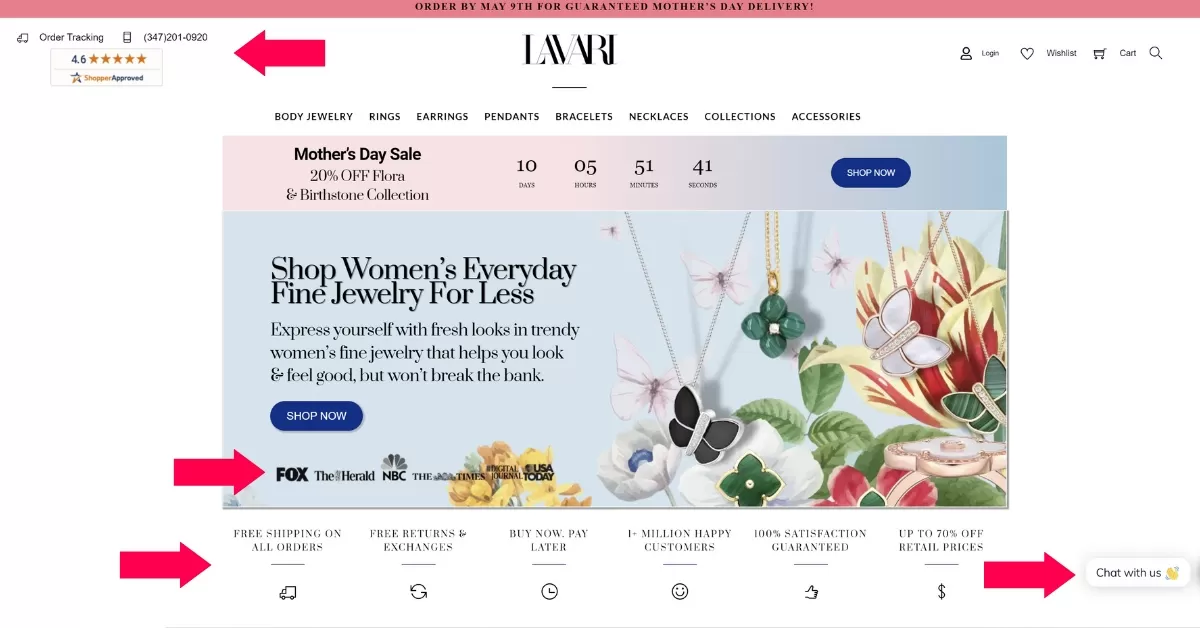
Your main goal of these pages is to get potential customers to stay on the page and not hit the back button, then make it simple for them to get to the product they want to find.
Product Page:
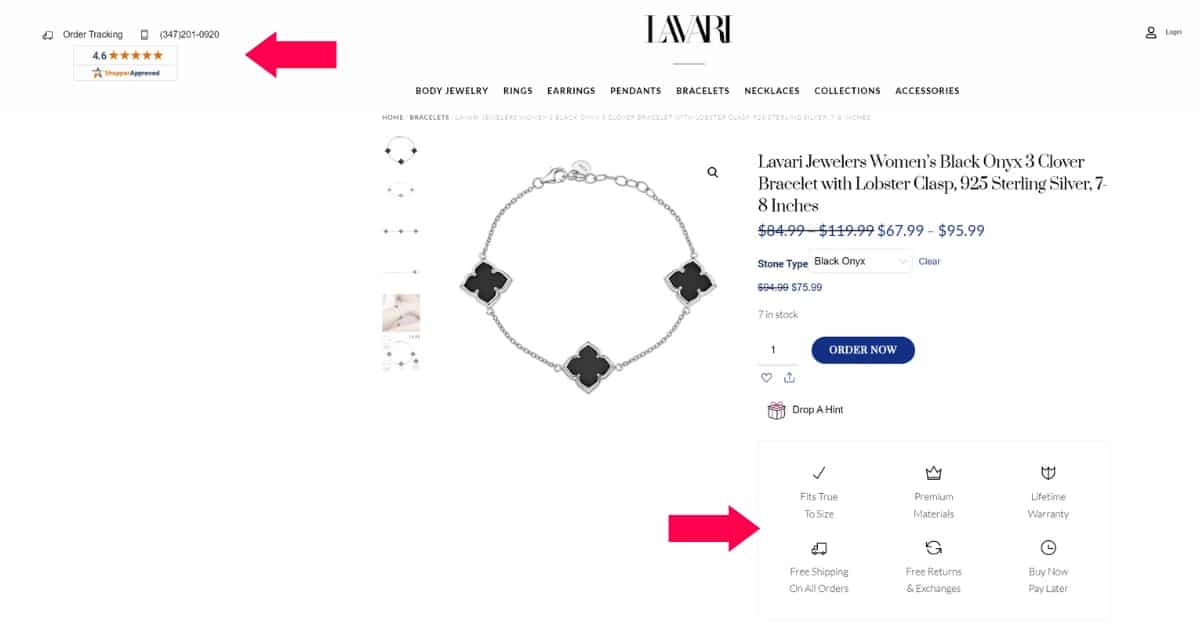
When they land, this is their first interaction with your site. That means you need to reinforce why they need you shop with you specifically as well as why this is the right product for them before they have to scroll down.

Once the customer clicks add to cart, you don’t want to lose them. You want to instruct them to take the next step: check out.
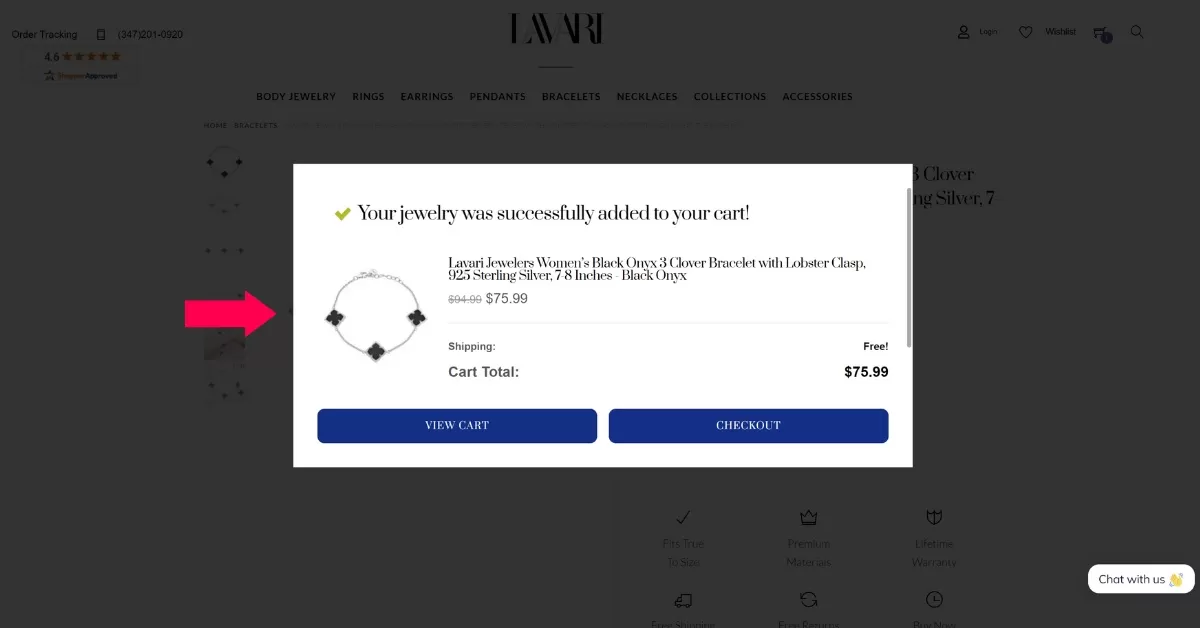
Checkout Page:
Your checkout page is where you seal the deal. It’s also where the most abandonment of a site happens.
Here’s how to optimize your checkout page:
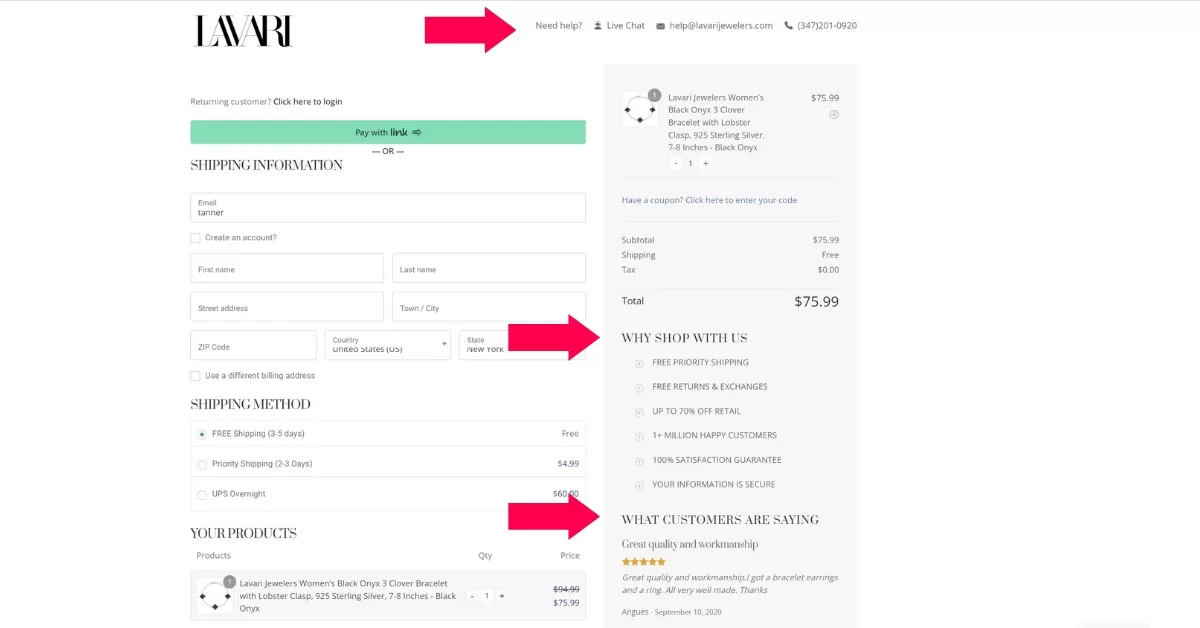
- Remove distractions by eliminating your main navigation.
- Show an email address and phone number to make the customer feel comfortable.
- Remind the customer why they should shop with you specifically and not go elsewhere.
- Showcase customer testimonials for social proof.
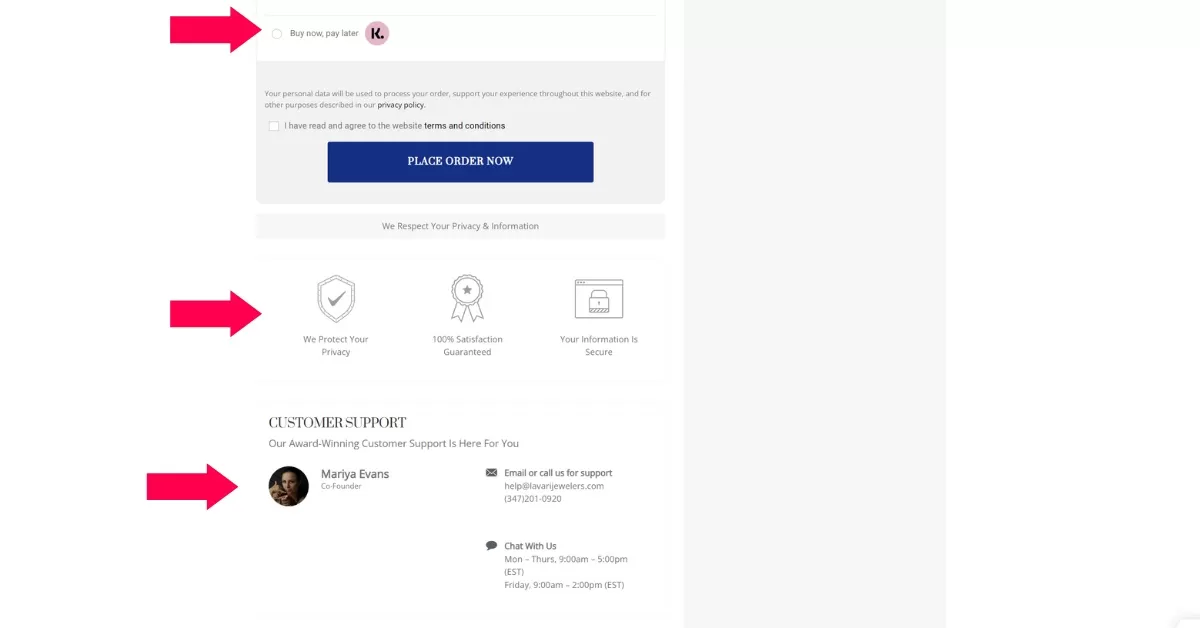
- Let the customer buy now and pay later.
- Showcase trust badges such as Secure Shopping, Warranties, Guarantees, etc. near where you ask them to complete the checkout.
- Show a face, name and contact information for customer service so the potential customer feels confident that if anything goes wrong, they know exactly who to contact and how.
Frequently Asked Questions
How do I know if my eCommerce site has a traffic problem or a conversion problem?
Check Google Analytics 4. If you have low views on your site overall, you have a traffic problem. If you have a high number of views on your product pages but no sales, you have a conversion or design problem.
What is “Buyer Intent” traffic and why does it matter?
“Buyer Intent” traffic consists of visitors who are ready to purchase, evidenced by specific search terms (e.g., “Vanilla Plant Protein 30 Servings”) rather than general research terms (e.g., “Protein Powder”). Focusing on buyer intent keywords drives higher conversion rates.
Why are customers abandoning their carts at checkout?
Customers often abandon carts due to friction or lack of trust. Common reasons include unexpected costs, lack of guest checkout, missing trust badges (like secure shopping icons), or not seeing contact information for customer support.
What are the most important trust signals to add to my website?
To build trust, ensure your site displays a clear phone number, customer service contact info with a face/name, “As Seen On” media logos, customer reviews, and clear return/warranty policies.
My blog gets traffic but no sales, what should I do?
If your blog brings in readers who aren’t buying, you need to bridge the gap. Embed products directly into your blog posts so they can “Add to Cart” without leaving the article, and place clear Call-to-Action (CTA) ads within the content relevant to the topic.