Key Takeaways
- Generating compliant Amazon product reviews without violating Amazon’s TOS requires structured, proven outreach systems.
- Customer reviews dictate organic search rankings, conversion rates, PPC performance, and overall Buy Box priority.
- Deploying compliant review channels—such as Amazon Vine, post-purchase packaging inserts, and automated review requests—builds sustainable social proof.
Generating customer reviews on Amazon without violating Amazon’s strict Terms of Service can feel remarkably slow for scaling brands.
Standard unprompted review rates on Amazon hover between 1% and 2%. However, accelerating compliant review generation is entirely achievable when executing structured post-purchase systems.
This strategic playbook outlines proven review generation systems across Seller Central, Vendor Central, and B2B channels under the direction of an eCommerce Fractional CMO.
Email Launch Lists
An owned email subscriber list remains one of your most valuable brand growth assets. Utilizing owned audience channels allows you to market continuously without incurring extra customer acquisition costs.
When executing new product launches on Amazon, an established email list serves as a primary driver for immediate sales velocity and early review generation.
As an eCommerce Fractional CMO, I structure pre-launch audience funnels using this step-by-step framework:
How Email Launch Lists Drive Product Reviews:
- Build off-platform awareness prior to catalog launch using targeted lead magnets (e.g., exclusive guides, pre-order access, or educational resources).
- Drive prospects to a dedicated landing page to capture email contact information.
- Nurture subscribers with value-add content to establish strong brand affinity prior to product release.
- Broadcast the official product launch announcement, directing high-intent subscribers to your Amazon listing via Amazon Attribution links.
- Follow up post-purchase to invite honest feedback. Early adopters hold the highest brand connection and highest review submission velocity.
Product Inserts
Capturing customer feedback requires requesting reviews at the exact moment of peak customer engagement—immediately upon product unboxing.
The unboxing experience represents the emotional high-point of the customer journey, making buyers exceptionally receptive to brand messaging.
Including a compliant product insert inside your packaging allows you to guide user onboarding while inviting feedback.
Primary Objectives of a Product Insert:
- Request an honest, unbiased product review on Amazon.
- Provide clear setup or usage instructions to minimize user error and lower return rates.
- Offer secondary promotional incentives for future direct-to-consumer purchases where compliant.
| Forbidden Insert Practices (Amazon TOS Violations) |
|---|
| Including website URLs or logos containing web domains directly on inserts inside FBA packaging. |
| Using conditional logic: “If you love your purchase, leave a review on Amazon; if you have issues, contact us.” |
| Using leading language explicitly soliciting “5-star” or “positive” reviews. |
| Offering free gifts, gift cards, or financial incentives contingent on submitting a review. |
| Including explicit promotional marketing claims inside FBA product units. |
Compliant Product Insert Copywriting Example:
Thank You Section:
“Thank you for your order! Register your product online to activate your standard manufacturer warranty.”
User-Generated Content (UGC) Section:
“Join Our Community: Tag @YourBrand and use #YourHashtag on social media to share your unboxing experience and be featured on our official channel.”
Review Invitation Section:
“Your Feedback Matters: As an independent brand, your honest product feedback helps us continuously refine our products and serves future shoppers. To leave a review:
1. Log into your Amazon account and navigate to Your Orders.
2. Select ‘Write a Product Review’ to share your experience.”
Free Product / Free Gift Funnels
While offering direct incentives for Amazon reviews explicitly violates platform guidelines, digital warranty and gift registration funnels provide a fully compliant alternative.
Platforms like GetReviews structure compliant post-purchase funnels that capture first-party customer data (names, emails, physical addresses) while facilitating review submissions.
How Digital Gift Funnels Work:
- The customer scans a QR code on packaging or an insert directing them to a custom off-Amazon portal.
- The user inputs their email address and Amazon order ID to claim a bonus asset or extended warranty.
- The portal invites the customer to share their honest feedback regarding their recent purchase.
- If feedback is positive, the system presents a direct link to submit their review on Amazon. If feedback indicates issues, the workflow directs the user to customer support to resolve the problem.
- The buyer submits their shipping information to receive their bonus gift.
This workflow complies with Amazon’s Terms of Service because receiving the bonus asset is not contingent on leaving a review, nor does the portal solicit positive feedback exclusively.
Product Packaging Design
Investing in high-quality, custom packaging yields operational benefits far beyond visual aesthetics:
Operational Benefits of Premium Packaging:
- Elevates perceived brand equity and product value.
- Reduces buyer remorse and post-purchase friction.
- Lowers return rates by setting clear expectations.
- Increases organic review generation rates.
Packaging serves as physical real estate to guide customer onboarding. Clear instructional copy and visual unboxing cues maximize buyer satisfaction, translating directly into higher review velocity.
Amazon Request A Review Button
Amazon provides a native, 100% compliant review request feature directly inside Seller Central order management.
The Request a Review feature dispatches an official system-generated email through Buyer-Seller Messaging, requesting both a product review and seller rating.

How To Execute the Request A Review Button:
- Log into Seller Central and navigate to Orders > Manage Orders.
- Filter for orders delivered within the last 5 to 30 days.
- Click on an individual Order ID link.
- Click the Request a Review button located in the top-right header.
- Confirm the request by selecting Yes.
Automated Email Follow-Up Sequences
To avoid manually triggering review requests across high order volumes, sellers can automate the Request a Review workflow using specialized software tools (e.g., Helium 10, Jungle Scout, or FeedbackFive).
These applications trigger Amazon’s official review request API automatically at designated post-delivery intervals (e.g., 7 days post-delivery for standard goods or 14 days for complex items), ensuring complete compliance while scaling outreach.
Amazon Vine Program
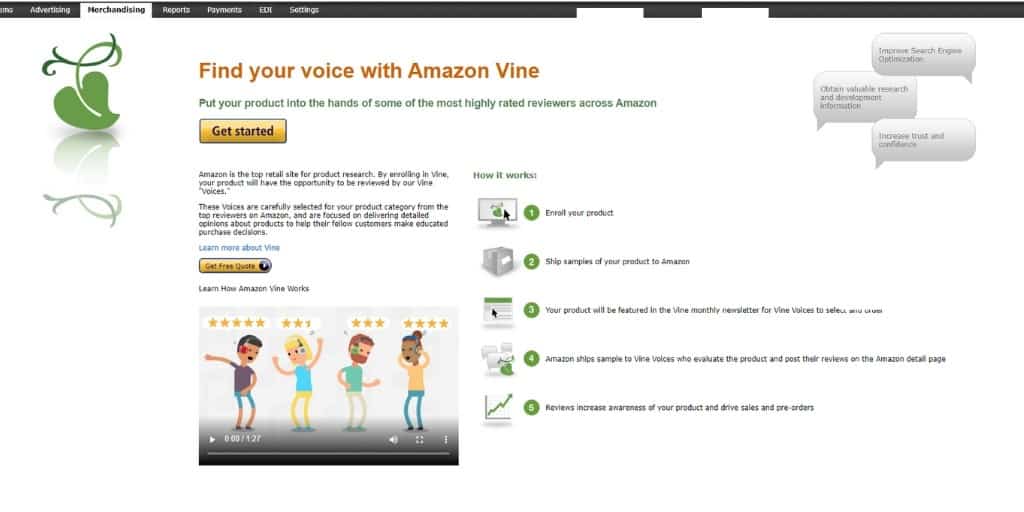
For brand-registered sellers and Vendor Central accounts, the Amazon Vine program provides an official mechanism to seed products to Amazon’s top-rated reviewers (Vine Voices).
How Amazon Vine Operates:
- Enroll eligible child ASINs inside Seller Central (under Advertising > Vine) or Vendor Central.
- Designate the number of sample units to allocate (up to 30 units per enrollment).
- Amazon receives and distributes sample units from active FBA inventory directly to participating Vine Voices.
- Vine Voice members test the product and post independent, highly detailed review feedback.
Compliant Product Tester Services
Compliant third-party testing platforms connect brands with engaged reviewer communities while adhering strictly to Amazon’s Communication Guidelines.
Compliance Architecture:
- Review submissions are entirely voluntary and non-incentivized.
- The brand maintains zero direct contact with individual product testers.
- Testers search, find, and purchase units organically, reinforcing natural search-find-buy behavioral signals.
Facebook Messenger Funnels
Executing targeted off-Amazon advertising campaigns allows brands to capture customer contact information prior to driving purchase intent to Amazon.
Using landing page software (such as LandingCube), brands construct interactive Messenger or email capture funnels:
Off-Platform Messenger Funnel Workflow:
- Deploy targeted ad traffic from social media channels to a custom opt-in landing page.
- Capture the shopper’s email address or Messenger subscription in exchange for a single-use promotional discount.
- Direct the user to Amazon via an Amazon Attribution link to complete the purchase.
- Deploy automated post-delivery messaging sequences to provide product support and invite compliant review feedback.
Targeting Passionate Enthusiasts
Targeting passionate niche enthusiasts significantly accelerates organic review rates.
Focusing initial ad spend and Creator partnerships on dedicated enthusiast segments builds early review velocity, establishing strong performance metrics that elevate broader search placement.
What NOT To Do When Seeking Amazon Reviews
| Compliant Best Practices (DO) | Prohibited TOS Actions (DO NOT) |
|---|---|
| Use Amazon’s native Request a Review API feature. | Send multiple manual review requests for a single order. |
| Provide helpful onboarding support via Buyer-Seller Messaging. | Include external website links or domain-branded logos in messages. |
| Invite honest, unbiased product feedback. | Offer rebates, gift cards, or discounts contingent on leaving reviews. |
| Enroll in official Amazon Vine sampling. | Have employees, family members, or friends submit reviews. |
How To Get Amazon Reviews – INFOGRAPHIC
Frequently Asked Questions
How To Delete Amazon Reviews? (AKA: How To Remove Amazon Reviews)
Sellers cannot directly delete customer reviews. You can utilize the Contact Customer tool in Seller Central for critical reviews to offer support, report policy violations via the Report Abuse link, or submit disputes to [email protected] if the review violates Amazon’s Community Guidelines.
Can I Export My Amazon Reviews?
Amazon does not offer a native 1st-party export tool for customer reviews. Third-party software and specialized browser extensions can export review data for sentiment analysis.
Can I Use My Amazon Reviews On My Website?
Technically, Amazon’s Conditions of Use state that customer reviews published on the platform remain Amazon’s intellectual property. Utilizing review quotes off-platform requires explicit reviewer consent or compliant display APIs.
Can I Get Amazon Reviews From Customers That Didn’t Purchase?
Yes. Non-purchasers who meet Amazon’s minimum account spend requirements ($50) can submit unverified reviews, though these lack the “Verified Purchase” badge and carry significantly less weight in conversion algorithms.
Does The Quantity and Quality of Amazon Reviews Impact My SEO?
Yes. Review volume and star rating averages directly dictate your click-through rate (CTR) and unit session percentage (conversion rate), which serve as heavily weighted organic ranking signals inside Amazon’s search algorithm.
Can Amazon Reviews Help Me With The Buy Box?
Yes. While product reviews drive conversion velocity, Seller Feedback ratings (account health feedback) directly influence Featured Offer (Buy Box) rotation algorithmically.